
How Can I Refresh a Home Office with Ergonomic Furniture?
A home office has become an essential part of many homes in the USA. With remote work, virtual meetings, and flexible schedules, creating a comfortable and efficient workspace is more important than ever. One of the most effective ways to refresh a home office is by incorporating ergonomic furniture. Ergonomic furniture is designed to support the body, improve posture, and reduce fatigue during long hours of work. A well-planned office setup boosts productivity, prevents discomfort, and enhances overall well-being. Many homeowners spend hours at a desk without realizing the negative impact of poor ergonomics.
Simple changes in chair height, desk design, or monitor placement can make a huge difference. Investing in ergonomic furniture not only improves physical comfort but also creates a professional-looking workspace. Ergonomic solutions can include adjustable chairs, sit-stand desks, keyboard trays, monitor arms, and supportive accessories. These changes help prevent back pain, neck strain, and repetitive stress injuries. By paying attention to ergonomics, a home office can become a place where work feels easier and more enjoyable. Proper lighting, organization, and furniture selection all contribute to a refreshing work environment. Many USA homes are upgrading their home offices to combine comfort, style, and functionality. This guide will explain how to refresh a home office with ergonomic furniture, providing practical tips and step-by-step advice. By implementing these strategies, homeowners can create a healthier, more productive, and visually appealing workspace.
How Can I Refresh a Home Office with Ergonomic Furniture?
Refreshing a home office with ergonomic furniture helps improve comfort, posture, and productivity. The right furniture reduces strain on the body and creates a professional and organized environment. Planning and choosing furniture thoughtfully ensures long-term benefits. Below are ten key areas to focus on when refreshing a home office with ergonomic furniture.
1. Choose an Ergonomic Chair
The chair is the most important piece of furniture in a home office. An ergonomic chair supports the natural curve of the spine, reduces back pain, and allows adjustments for height, tilt, and lumbar support. Look for chairs with adjustable armrests, seat depth, and backrest angle. Many USA homeowners prefer chairs with breathable mesh for comfort during long hours. Properly adjusted chairs promote good posture and reduce fatigue. Test different chairs to find one that suits your height, weight, and desk setup. A quality ergonomic chair is an investment in comfort and productivity. Chairs with wheels and swivel features improve mobility in the workspace. Adding a small lumbar pillow can provide extra support. The chair should allow your feet to rest flat on the floor or on a footrest. Ergonomic chairs help prevent long-term health issues related to poor seating. Selecting the right chair sets the foundation for a comfortable home office.
2. Invest in a Sit-Stand Desk
Sit-stand desks allow you to alternate between sitting and standing, reducing prolonged pressure on the lower back. Adjustable height desks are ideal for home offices because they accommodate different users and postures. Many USA homes use electric desks for convenience, while manual crank desks work for smaller spaces. Stand-up desks improve circulation, reduce fatigue, and encourage movement throughout the day. Pairing a sit-stand desk with an anti-fatigue mat adds extra comfort during standing periods. Adjust the desk height so elbows are at a 90-degree angle and wrists remain straight while typing. Alternating between sitting and standing can increase focus and energy. Sit-stand desks come in various sizes and styles to fit home office decor. They also create a dynamic workspace that adapts to different tasks. Standing occasionally helps prevent stiffness and promotes overall well-being. Proper desk height is essential to maintain ergonomic benefits. Combining ergonomic chairs and sit-stand desks maximizes comfort and flexibility in a home office.
3. Use an Adjustable Monitor Arm
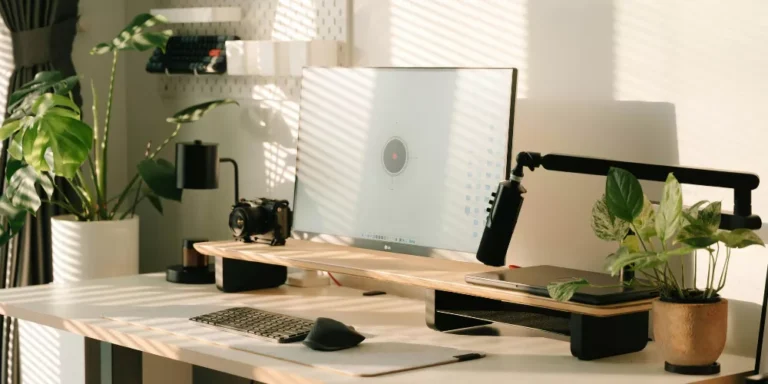
Monitor placement is critical for reducing neck and eye strain. An adjustable monitor arm allows you to position the screen at eye level and at an optimal distance from your face. Many ergonomic guidelines recommend keeping the top of the monitor at or slightly below eye level. Monitor arms free up desk space, creating a cleaner and more organized work area. Some models support multiple monitors for multitasking. Proper monitor height reduces neck pain and improves posture during long work sessions. Many USA homeowners use monitor arms for laptops or desktop screens. Adjustable arms allow tilting and swiveling to reduce glare from windows or lights. Position the monitor about 20 to 30 inches from your eyes for optimal viewing. A well-placed monitor improves focus, reduces discomfort, and makes work more efficient. Combining a monitor arm with an ergonomic chair creates a balanced and comfortable setup.
4. Add a Keyboard Tray or Adjustable Desk Accessories
A keyboard tray helps keep wrists straight and shoulders relaxed while typing. Adjustable trays allow you to set the height and angle of the keyboard for comfort. This prevents repetitive strain injuries such as carpal tunnel syndrome. Many USA home offices incorporate ergonomic mouse pads with wrist support alongside keyboard trays. Desk accessories like monitor risers, document holders, and cable organizers improve workflow and reduce clutter. Proper alignment of the keyboard and mouse reduces fatigue and supports good posture. Adjustable trays ensure that the elbows remain at a 90-degree angle while typing. Organizing frequently used items within reach improves efficiency. Ergonomic accessories make a significant difference in long-term comfort. Positioning the keyboard correctly also prevents shoulder tension. Combining ergonomic chairs, desks, and accessories creates a complete workstation that promotes health.
5. Ensure Proper Lighting and Reduce Glare
Good lighting is an important part of an ergonomic workspace. Position the desk near natural light to reduce eye strain and enhance mood. Use adjustable task lamps to illuminate documents or keyboard areas. Avoid placing monitors directly in front of windows to prevent glare. Many USA home offices include LED desk lamps with dimming options for flexible lighting. Proper lighting reduces headaches, fatigue, and visual discomfort. Ambient lighting combined with focused task lighting creates a comfortable workspace. Monitor brightness should match the surrounding light to minimize strain. Adjustable lighting ensures you can work efficiently at different times of the day. Incorporating curtains or blinds allows control of natural light. Lighting plays a critical role in maintaining ergonomics and productivity.
6. Organize Storage for Easy Access
Cluttered spaces reduce efficiency and increase stress. Include ergonomic storage solutions like shelves, filing cabinets, or under-desk drawers within easy reach. Frequently used items should be close to the workstation to avoid repetitive bending or twisting. Many USA homeowners prefer modular storage solutions that adapt to changing needs. Vertical storage utilizes wall space and keeps the desktop clear. Organizing office supplies and documents prevents distractions and improves focus. Storage should be accessible while seated or standing to maintain ergonomics. Avoid overloading drawers or cabinets, as this can create strain when reaching. Clearly labeled storage bins or trays save time. Well-organized storage supports a comfortable and efficient workspace. Reducing clutter enhances both productivity and visual appeal.
7. Add an Ergonomic Footrest
A footrest supports the legs and encourages proper posture while sitting. Adjustable footrests allow you to keep feet flat and knees at a 90-degree angle. This reduces pressure on the lower back and promotes circulation. Many USA home offices incorporate small, portable footrests that slide under the desk. Footrests are especially useful for shorter individuals or when using higher desks. Ergonomic footrests help maintain comfort during extended sitting periods. Use textured or cushioned surfaces for added support. Position the footrest so the thighs remain parallel to the floor. Combining a footrest with an ergonomic chair reduces strain on the back and legs. Regularly using a footrest improves long-term comfort and posture. Adjustable models allow flexibility as desk height changes during standing periods.
8. Choose a Comfortable and Supportive Chair Mat
Chair mats protect flooring while providing a smooth surface for chair movement. They reduce strain on the legs and improve mobility during seated tasks. Many USA home offices use polycarbonate or vinyl mats that suit carpet or hardwood floors. Chair mats reduce friction and allow chairs to glide easily, minimizing effort. Properly sized mats ensure that the chair remains stable while moving. Mats also prevent wear and tear on flooring surfaces. Ergonomic mats reduce fatigue from repeated movements and enhance comfort. Place the mat so it fully covers the area where the chair moves. Combine chair mats with ergonomic chairs to improve both posture and ease of movement. A comfortable mat supports long hours of seated work.
9. Personalize with Ergonomic Accessories
Accessories like wrist rests, lumbar pillows, and seat cushions improve comfort. Monitor glare shields, document holders, and cable organizers enhance workflow. Many USA homeowners personalize their home office with these ergonomic tools to suit their individual needs. Adjustable lumbar pillows provide extra back support. Wrist rests maintain a neutral wrist position during typing. Cushions and pads reduce pressure points and increase comfort. Accessories should complement existing ergonomic furniture for maximum benefit. Choose items that are durable, easy to clean, and adjustable. Personalization improves long-term usability and makes the workspace inviting. Using the right accessories helps prevent strain and fatigue. A well-accessorized home office promotes productivity and wellness.
10. Maintain a Clean and Inviting Workspace
Regular cleaning and organization are essential for an ergonomic office. Dust, clutter, and disorganized cables can reduce comfort and efficiency. Create routines to tidy up the desk daily. Many USA homeowners use cable management systems, drawer organizers, and desktop trays to keep surfaces clear. A clean workspace reduces distractions and promotes mental clarity. Ergonomic furniture works best when the area is uncluttered and properly arranged. Regular maintenance extends the lifespan of furniture and accessories. Keep floor space clear to move easily and maintain proper posture. An inviting office encourages consistent use and enhances productivity. Proper workspace hygiene supports both physical and mental well-being. Ergonomic furniture combined with cleanliness creates a healthy and efficient home office environment.
Conclusion
Refreshing a home office with ergonomic furniture improves comfort, productivity, and health. Selecting an ergonomic chair, sit-stand desk, and monitor arm ensures proper posture and reduces strain. Accessories such as keyboard trays, footrests, and chair mats enhance support and efficiency. Proper lighting, organized storage, and a clutter-free environment create a functional and pleasant workspace. Personalized ergonomic tools further improve comfort for long hours of work. Alternating between sitting and standing boosts circulation and reduces fatigue. A well-planned ergonomic office supports mental clarity, energy, and overall well-being. Many USA homeowners benefit from ergonomic upgrades in both small and large home offices. Regular maintenance keeps furniture and accessories in good condition.
Thoughtful design and careful selection create a professional and inviting workspace.Ergonomic principles, combined with organization and lighting, refresh the home office effectively. By implementing these steps, homeowners can enjoy a healthier, more productive, and comfortable work environment. Ergonomic furniture is an investment that supports both physical health and long-term efficiency. A refreshed workspace makes remote work easier and more enjoyable. The right setup encourages consistent use and improves the overall home office experience.